
How to Install and Customize LEO Preloader on Shopify (Step-by-Step Guide)
In today's competitive eCommerce, shoppers expect fast, smooth, and visually consistent stores. Even minor issues like white screen flashes or abrupt page loads can negatively impact engagement and bounce rates.
This is where the LEO Preloader and Transitions Shopify app makes a meaningful difference. In this in-depth guide, we'll explore how preloaders improve perceived speed and how you can implement them seamlessly on your Shopify store using a lightweight, no-code solution.
What Is LEO - Preloader & Transitions?
LEO - Preloader & Transitions is a Shopify app designed to enhance user experience by displaying animated preloaders and smooth transitions during page loads. It eliminates white screen flashes and delivers a polished, professional browsing experience. It supports GIFs, images, SVGs, and logos, allowing merchants to maintain consistent branding throughout loading moments.
Why Preloaders Matter for Shopify Stores
When a Shopify page loads slowly or shows a blank screen, users often assume something is broken. This perception leads to higher bounce rates and reduced trust, even if the actual load time is acceptable.
A well-designed preloader reassures visitors that the site is loading correctly.
Key Features of LEO - Preloader & Transitions Shopify App
1. Lightweight & Optimized Performance
The app is engineered to load quickly without causing layout shifts or slowing down your store. It runs efficiently alongside other Shopify apps and scripts.
2. Custom Animations & Branding
You can choose from preset animations or upload your own GIFs, images, SVGs, or logos. This ensures your loader perfectly matches your brand identity.
3. No-Code Setup
LEO uses Shopify's theme extension system, meaning there's no need to edit theme files or write custom code. Everything works through toggles and settings.
4. Smart Auto-Hide Timing
To prevent stuck or looping preloaders, the app includes intelligent auto-hide logic that ensures animations disappear once content is ready.
5. Theme-Safe & App Compatible
It works smoothly with all Shopify themes and popular third-party apps, making it safe for both new and established stores.
Installation & Activation on Shopify
Installing LEO Preloader & Transitions takes just a few minutes and requires no coding.
Step 1: Install the App
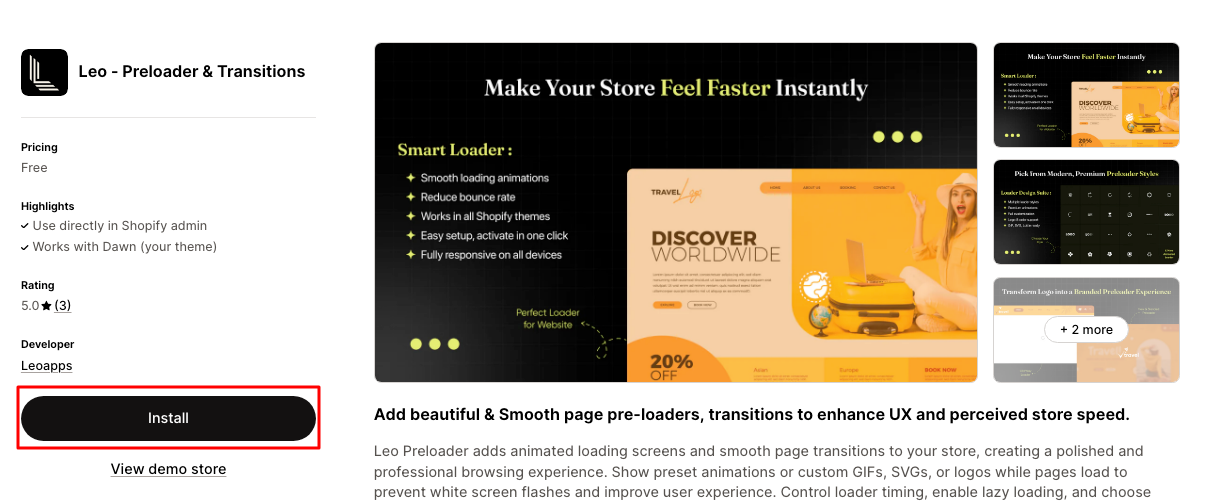
- Log in to your Shopify Admin
- Go to the Shopify App Store
- Search for LEO - Preloader & Transitions
- Click Install and approve the required permissions
Step 2: Activate the Preloader
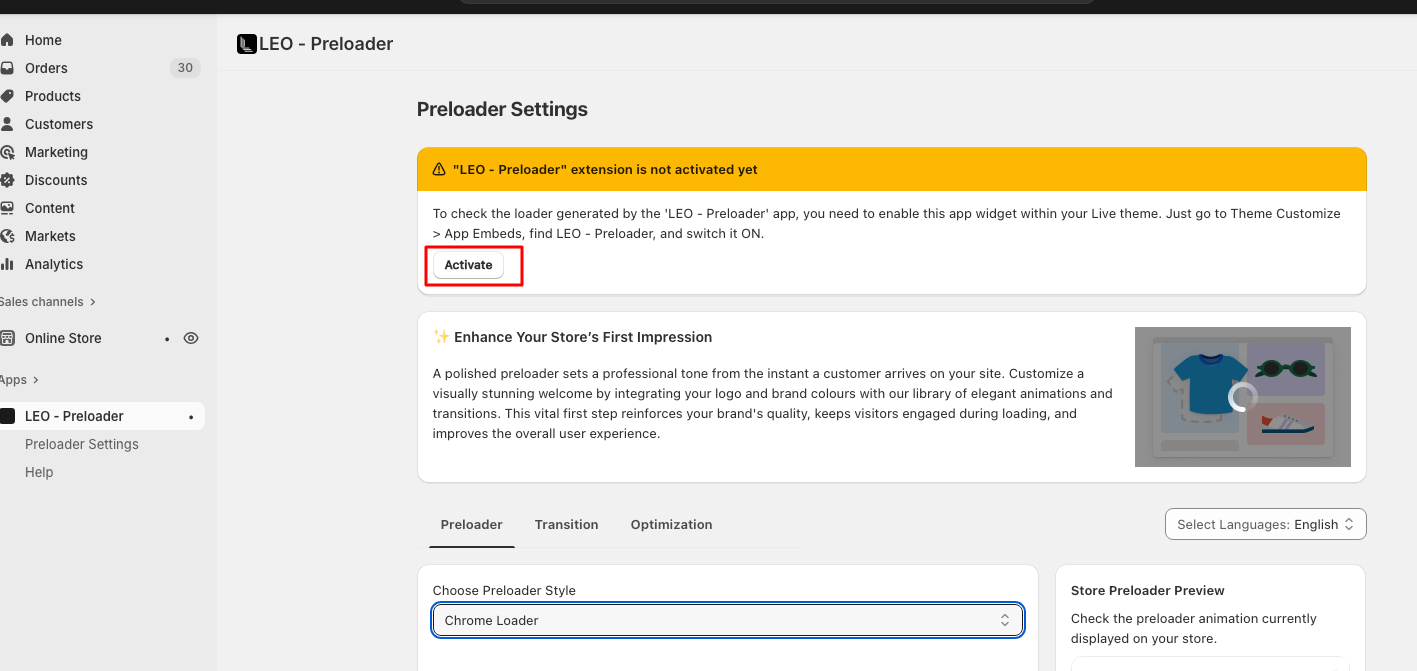
- Open the LEO app dashboard
- Click Activate
- You'll be redirected to the Shopify Theme Editor
- Go to App Embeds
- Toggle LEO - Preloader to ON
- Click Save

Once activated, the preloader becomes live across your store instantly.
Why LEO Is Better Than Custom Code
LEO offers a future-proof alternative. It's built using Shopify's official extension framework, ensuring compatibility, safety, and long-term reliability without developer dependency.
Custom preloaders often require:
- JavaScript Injections
- Theme Edits
- Ongoing Maintenance
These approaches increase the risk of conflicts after theme updates or Shopify changes.
Best Practices for Using Preloaders
- Keep animations simple and brand-aligned
- Avoid overly long loader durations
- Use subtle transitions instead of flashy effects
- Test performance on mobile and desktop
- Regularly review UX impact using analytics
Following these best practices ensures preloaders enhance experience rather than distract users.
Final Thoughts
If you want to elevate your Shopify store's user experience without compromising performance, LEO Apps is a practical and professional solution. It bridges the gap between speed, design, and usability while reinforcing brand trust.
By turning unavoidable loading moments into branded interactions, this Shopify preloader app helps create a smoother, more engaging shopping journey, one that keeps users confident, comfortable, and ready to convert.
LEO Apps is an official Shopify Apps Partner offering powerful, lightweight solutions to improve store experience and operations. From building mobile apps to enhancing loading UX and simplifying post-checkout changes, LEO Apps helps Shopify merchants grow efficiently.
Check out all LEO Apps on Shopify: https://apps.shopify.com/partners/leoapps
Frequently Asked Questions
1. Does LEO - Preloader & Transitions slow down my store?
No. The app is lightweight and optimized to avoid layout shifts or performance issues.
2. Can I use my own logo or GIF as a preloader?
Yes. You can upload custom GIFs, images, or logos directly from the app dashboard.
3. Is coding required to set up the app?
No. The entire setup is no-code and works through Shopify's theme editor and app embeds.
4. Will it work with my current Shopify theme?
Yes. The app is theme-safe and compatible with all Shopify themes and popular apps.
