
Turn Products Into Bookable Services With Seamless Shopify Appointment Scheduling
Sell appointments, consultations, classes, events, rentals, or services directly from your Shopify store. Replace "Add to Cart” with “Book Now,” automate scheduling, prevent double bookings, and let customers book their preferred time in just a few clicks.
Less Manual Scheduling
Timezone-Accurate Bookings
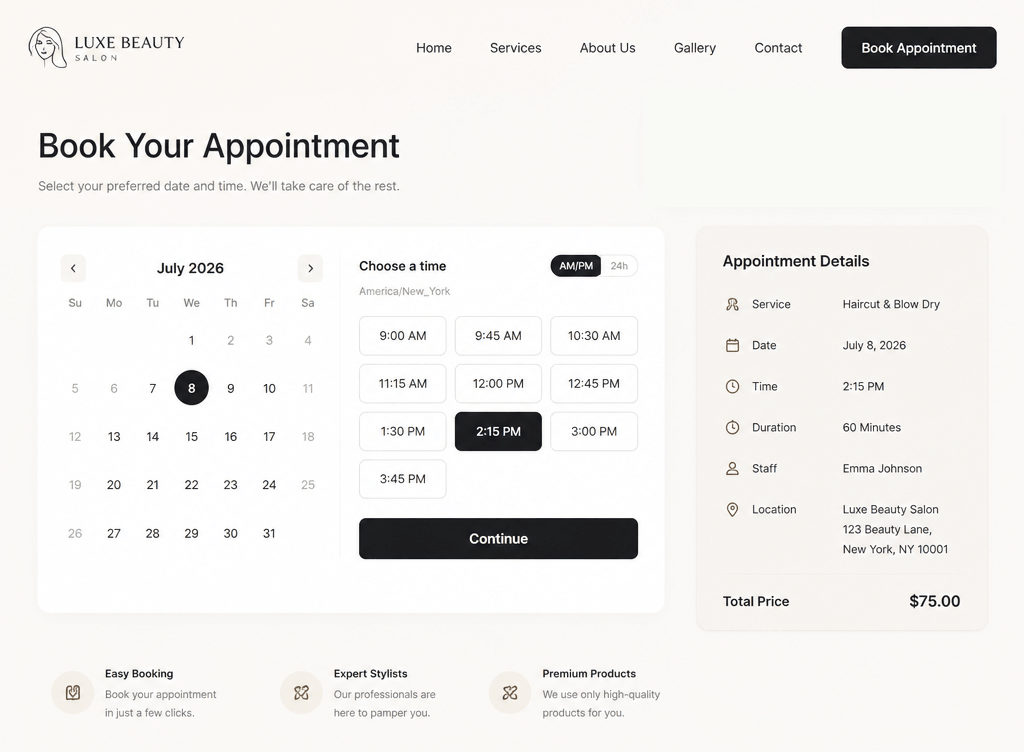
Everything a Booking Business Needs
Create a professional booking experience that saves time, improves customer satisfaction, and keeps your schedule perfectly organized.

Everything you need to manage appointments, bookings, availability, reminders, and customer scheduling from one Shopify app.
Replace Add to Cart With Book Now
Convert selected Shopify products into bookable services instantly. Customers choose their preferred date and time before checkout, creating a smooth booking experience without editing your store’s theme code.
Offer Paid Bookings or Inquiry Mode
Accept online payments through Shopify Checkout or enable inquiry mode when pricing depends on customer requirements. Perfect for consultations, quotations, custom services, rentals, and appointment requests.
Flexible Availability Management
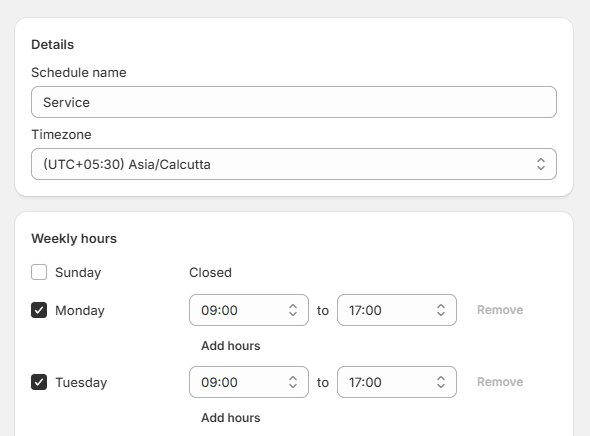
Define weekly schedules, working hours, holiday exceptions, lead time, booking buffers, and daily appointment limits. Customize availability for every service to match your business operations.
Automatic Email Notifications
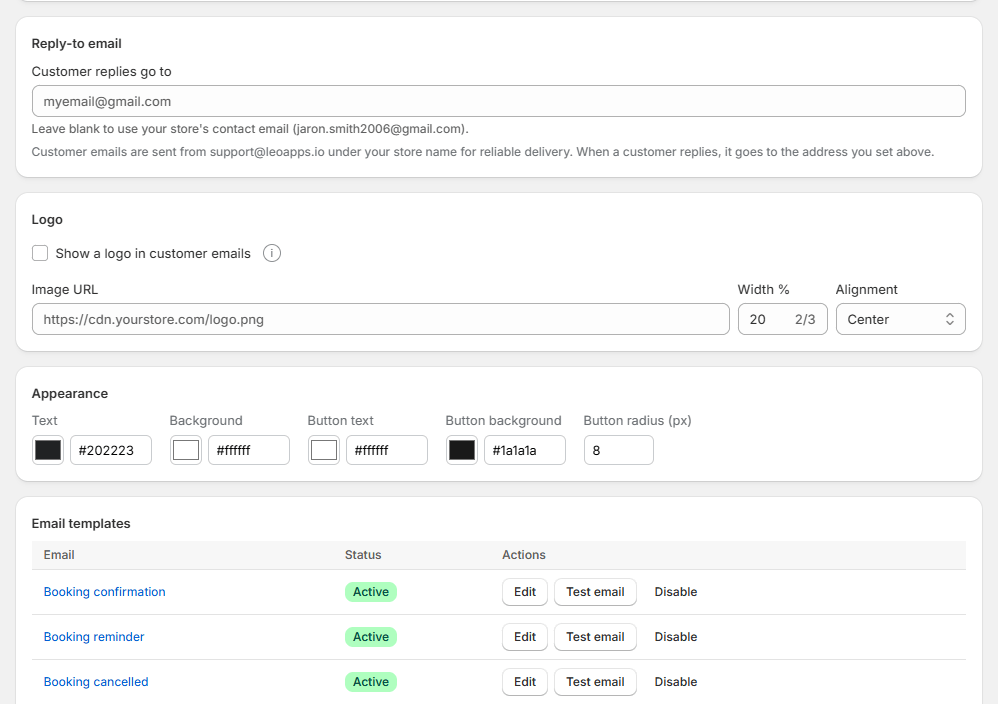
Keep customers informed with instant booking confirmations, appointment reminders, reschedule links, and cancellation options. Reduce missed appointments while improving the overall customer experience.
Double Booking Protection
LEO checks real-time availability the moment a slot is selected, so two customers can never claim the same time. Combined with buffer settings, this keeps your calendar accurate even during high-traffic launch days.
Timezone-Safe, Multilingual Admin
Appointment times automatically adjust to each customer’s local timezone, removing confusion for stores serving multiple regions. The admin dashboard itself is available in more than 20 languages.
From Product to Booking in 3 Steps
Configure your services, publish available time slots, and start accepting appointments directly from your Shopify store.
Launch your online appointment booking system in minutes without coding or complicated setup.
Select Products for Booking
Choose the products or services customers can reserve. Replace the standard "Add to Cart" button with a "Book Now" button while keeping Shopify Checkout fully integrated.
Configure Your Availability
Set weekly business hours, appointment duration, holidays, lead times, booking buffers, daily capacity, and timezone preferences. Every service can have its own customized scheduling rules.
Accept, Manage, and Automate Bookings
Customers book their preferred time, receive automatic confirmation and reminder emails, and can reschedule or cancel using self-service links. Every booking syncs instantly inside your Shopify admin.
One App, Many Booking Use Cases
Reduce scheduling friction with automated communication, flexible booking management, and accurate appointment coordination.
Appointments, events, and rentals all run on the same flexible booking engine underneath.
Service-Based Appointments
Salons, spas, tutors, consultants, and clinics can list each offering as a bookable product with its own duration, hours, and pricing. Customers see real-time openings, eliminating the back-and-forth of manual scheduling over email or phone calls.
Ticketed Events & Classes
Workshops, fitness classes, and limited-seat events benefit from daily limits and lead-time rules that prevent overselling a session. Each event date functions as its own bookable slot, so capacity stays accurate without manual inventory tracking.
Equipment & Space Rentals
Rental businesses can block specific dates, set minimum lead time for pickups, and add buffers for cleaning or maintenance between reservations. This keeps physical inventory, like gear, venues, or vehicles, from ever being double-booked.
Accuracy Built Into Every Booking
A booking system only earns trust when it prevents scheduling errors automatically, so merchants can hand off day-to-day calendar management with confidence.
Real-time availability checks and timezone handling keep every appointment conflict-free by design.
Ready to Simplify Appointment Booking?
Launch your Shopify booking system quickly with flexible scheduling tools designed for growing businesses of every size.
Let’s try Leo apps!Replace manual scheduling with an automated booking system that works seamlessly inside your Shopify store.
Have Questions About App? We've Got Answers
From availability rules to reminder emails, LEO handles the scheduling logic so you can focus on delivering the service, not managing spreadsheets.
-
What is LEO Appointment Booking used for?
LEO turns any Shopify product into a bookable service, letting customers choose a date and time instead of just adding an item to their cart. It's built for appointments, rentals, classes, and events.
-
Can I replace the "Add to Cart" button with "Book Now"?
Yes. You can replace the standard "Add to Cart" button with a "Book Now" button on selected products without modifying your Shopify theme code.
-
Does LEO require custom coding or theme edits?
No. LEO works with any Online Store 2.0 theme and replaces "Add to Cart" with "Book Now" automatically, without touching your theme's code.
-
Can I accept bookings without collecting payment?
Yes. Enable Inquiry Mode to collect booking requests without charging customers during checkout. This is ideal for custom quotes, consultations, and services with variable pricing.
-
Does LEO send reminders to customers automatically?
Yes. Customers receive an automatic confirmation email after booking and a reminder email as their appointment approaches, both including a link to reschedule or cancel.
-
Is LEO suitable for stores serving customers in different time zones?
Yes. Booking times are shown and adjusted for each customer's local timezone, so there's no confusion around appointment times across regions.